DocInsight 2026.1 introduces a new project foundation for building connected Markdown and Delphi API documentation. Define your content and output targets in one project, then check and build HTML sites and CHM help files locally or in CI.
The new docinsight.json manifest brings Markdown topics, Delphi source code, assets, site metadata, and output targets into one repository-native project. Publish Markdown, generated Delphi API reference, or both as an HTML site or CHM help file, with shared navigation and links between guides and API symbols.
For an introduction to the project model and recommended layout, see DocInsight project.
Existing .diproj projects remain supported. To adopt the new manifest when ready, see Migrate a legacy project, which uses docinsight init --from-legacy to import the existing configuration.
Write topics in the Markdown editor of your choice, then use DocInsight to check and build them. DocInsight Markdown is based on CommonMark and supports common GitHub Flavored Markdown extensions, including tables, task lists, and strikethrough. Authors can use familiar Markdown together with DocInsight features for larger documentation sets.
For supported syntax and authoring features, see Markdown syntax, Use variables, Add callouts, and Add links and cross-references.
Markdown topics and generated Delphi API reference can link to each other in both directions through the same documentation model. Xrefs identify their targets independently of generated paths, so links remain stable when an output mount or URL layout changes. In Markdown, use a labeled xref: link or an Xref autolink to reference an API symbol:
See [IList<T>](xref:mylibrary/MyLibrary.Collections/IList{T}).

See <xref:mylibrary/MyLibrary.Collections/IList{T}>.
The labeled form controls the link text. The autolink uses the target's display name, so it does not need a separate label.
Markdown topics can also configure an Xref base and document-local aliases in front matter, then use WikiLinks as shorthand for labeled or unlabeled Xrefs:
---
xref:
  base: mylibrary/MyLibrary.Collections
  aliases:
    types: mylibrary/MyLibrary.Types
---

See [[IList{T}.IndexOf]] and [[types/IComparer{T}|Comparer]].
In Delphi XML documentation comments, use xref with <see> for an inline link or <seealso> for a related-topic link back to Markdown:
/// <summary>
///   Creates a list. See the <see xref="docs/collections">collections guide</see>
///   for usage patterns.
/// </summary>
/// <seealso xref="docs/collections">
///   Collections guide
/// </seealso>
class function CreateList<T>: IList<T>; overload; static;
For complete examples and linking rules, see Add links and cross-references and Link API symbols and topics.
Publish the same Markdown guides and generated API reference as an HTML site or a compiled CHM help file.
HTML output presents guides and API reference in one site with title search and light and dark themes.
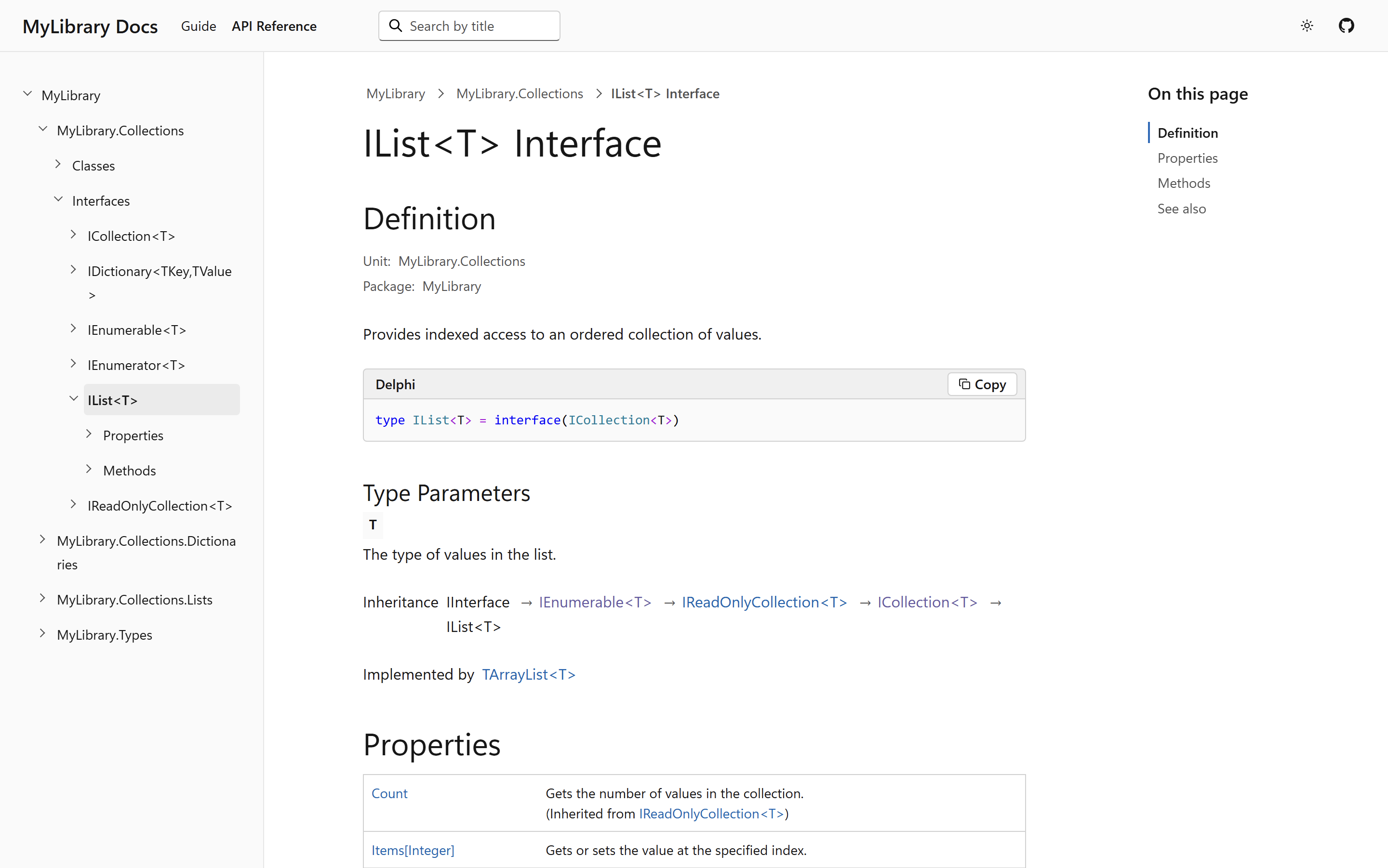
Explore the MyLibrary sample documentation site.
HTML targets now support clean URLs and root-relative links through the target's urls.page and urls.link settings. Clean URLs omit .html from public page addresses, while root-relative links resolve internal navigation and assets from the configured site base path. The settings can be used independently or together to match the URL layout of the hosting environment, including sites deployed below a domain subpath.
For configuration, see Configure page and link URLs.
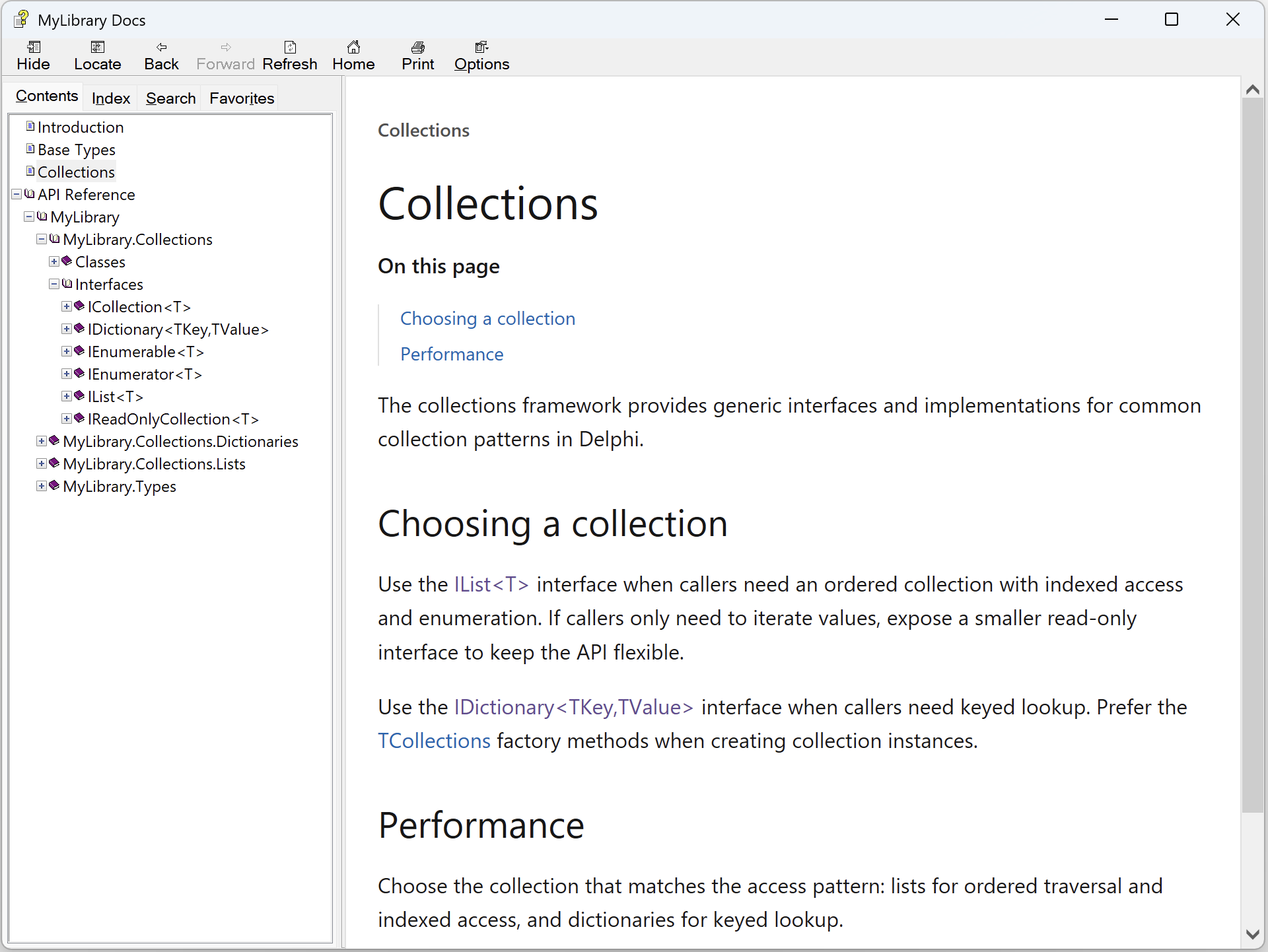
The new Learn-style CHM output presents both content types in one navigable help system.
The new project manifest supports a default site configuration or multiple named entries under sites. Each output target can select a site configuration and a set of content entries, allowing one project to publish distinct documentation sites with their own identity, deployment settings, and content. See Site settings.
Configure formats, destinations, and content selection independently for each output target.
The CLI now supports the complete project workflow, from initializing and checking a project to building, opening, and cleaning its outputs. Named target selection, output path overrides, verification, and additional command options provide more control over local and automated workflows.
The new docinsight init command creates the docinsight.json manifest and starter content. Use the delphi template to initialize a Markdown guide and Delphi API documentation together:
docinsight init --template delphi
For a Markdown-only project, use the markdown template instead.
To import an existing .diproj instead of starting from a template, use the legacy project migration workflow.
See Initialize a project for templates and initialization options.
The new project model manages generated output as named targets. A project can designate output.default_targets for routine commands; if the setting is not configured, DocInsight selects every target.
Use no selection option for the defaults, --target to select by name, or --all-targets to select every target:
docinsight build
docinsight build --target site
docinsight build --all-targets
The check, build, and clean commands can operate on multiple targets; open selects one target.
Append =PATH to any repeated --target value to override that target's output path for one command:
docinsight build --target site=Z:/docs/mylibrary --target help=Z:/docs/mylibrary.chm
Each override applies only to its named target, and a repeated target without =PATH continues to use its configured path. Overrides do not change the manifest. This lets a team keep local, ignored output paths in the shared manifest while a publishing job deliberately writes to shared or deployment locations. See Select output targets for complete selection and override rules.
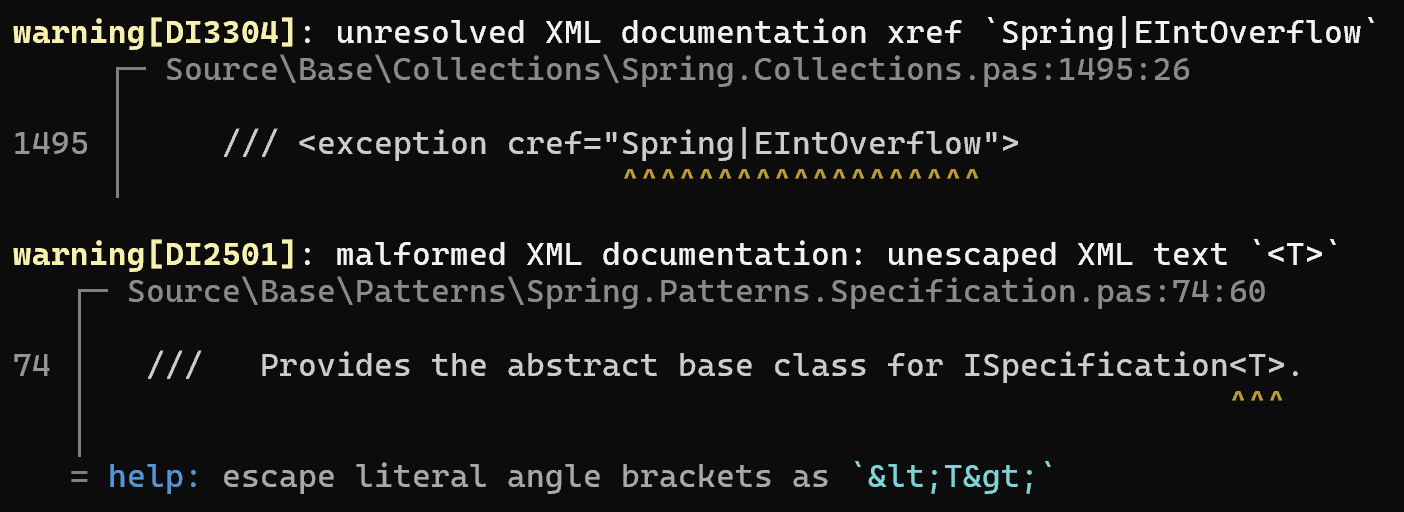
The check and build commands now report stable diagnostic codes, precise source locations, annotated source excerpts, and actionable help. This makes documentation problems such as unresolved cross-references and malformed XML easier to identify and fix. See Check documentation.
Use --open to open one target after a successful build, or run docinsight open to open existing output without rebuilding:
docinsight build --target site --open
docinsight open site
Both commands handle the configured HTML URL style automatically. For clean URLs or root-relative links, DocInsight starts a local HTTP server and opens the site in your browser; output with default HTML URLs and relative links opens directly from the local file system. See Build documentation and Open documentation.
DocInsight now builds output incrementally. Each build runs the complete documentation pipeline and records generated paths and content hashes in a private output manifest. When publishing the planned output, DocInsight leaves unchanged files in place, writes changed files, and removes stale generated files.
Let DocInsight manage generated output
Before the first 2026.1 build, remove existing generated files from each HTML target's configured path. Files created before the output manifest are not tracked and can remain as stale output.
Afterwards, manage the target directory with docinsight build and docinsight clean. Do not edit generated files or store unrelated files there; they may be overwritten by a later build. Change the documentation sources and rebuild instead.
By default, DocInsight trusts the output manifest when reusing a destination file. Use --verify-output to hash reusable destination files and rewrite any whose contents no longer match the planned output:
docinsight build --verify-output
For state reuse and verification behavior, see Incremental builds.
The new docinsight clean command removes files owned by previous builds without recursively deleting the output root or unrelated files:
docinsight clean --target site
Use --dry-run to review the operation first. Clean supports the same default, named, all-target, format, and output-path selection rules as other output commands. It is available for docinsight.json projects and does not clean output from legacy .diproj projects. See Clean generated output.
The check and build commands now display progress indicators for long-running work. DocInsight automatically adapts colors, progress indicators, and file hyperlinks to the current terminal; use --color, --progress, and --hyperlinks with auto, always, or never to control them explicitly. The corresponding --no-color, --no-progress, and --no-hyperlinks options provide shortcuts for disabling these features.
Use --no-input to prevent prompts in scripts and CI. See Control console output and logs and Automate CLI workflows for usage and complete option details.
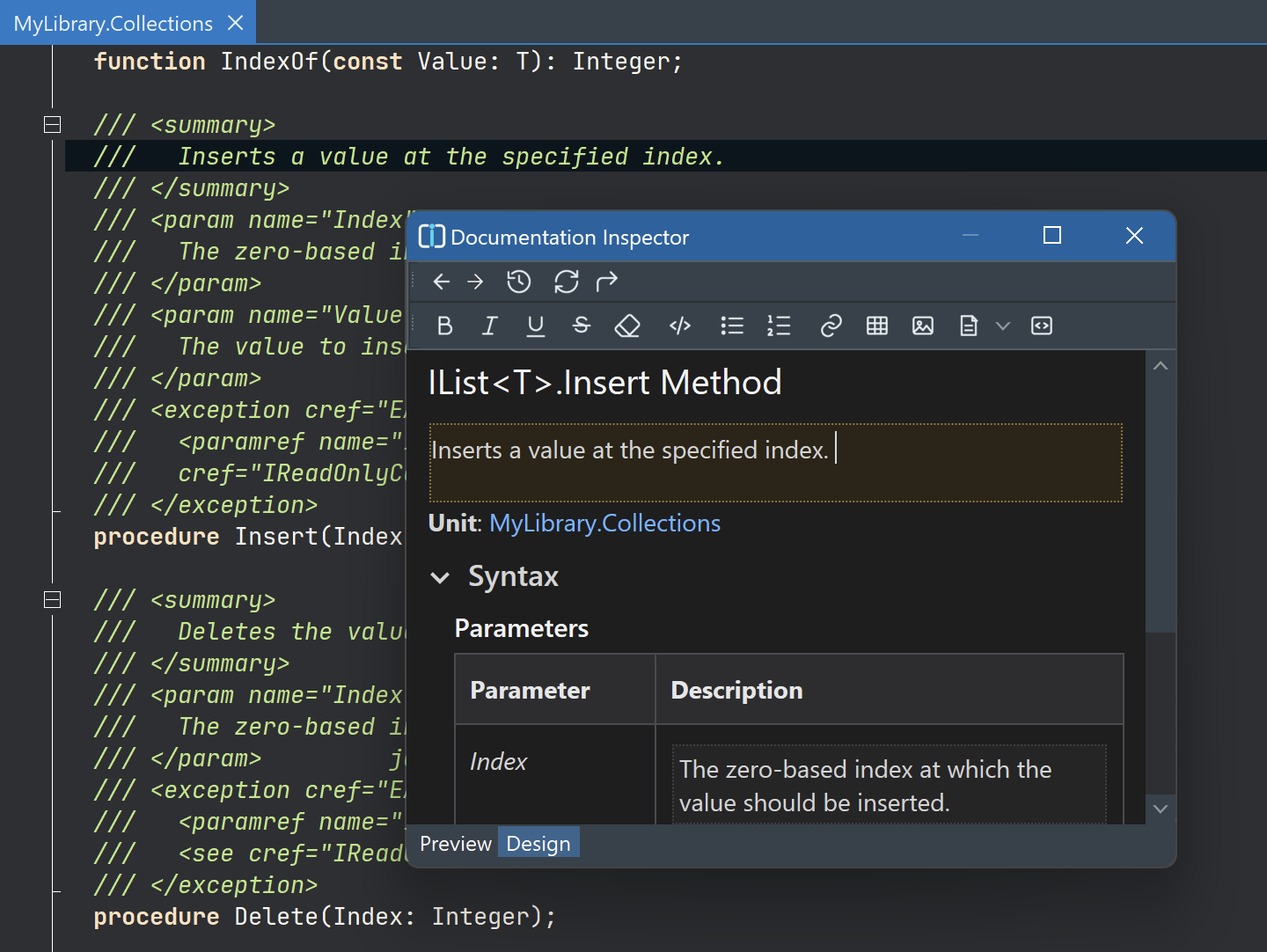
The Delphi IDE extension now supports high-DPI icons and the IDE dark theme. Documentation Inspector provides a focused surface for viewing and editing the XML documentation comment associated with the declaration at the source-editor caret.
DocInsight 2026.1 also adds source analysis for the Delphi 13.1 WinARM64EC target. For supported Delphi IDE versions and host architectures, see Delphi extension compatibility.
The installed docinsight.exe entry point is now a stable launcher rather than a version-specific CLI. It dispatches ordinary commands to the configured default toolchain, so PATH entries and scripts can remain unchanged when toolchains are updated. Prefix a command with +TOOLCHAIN to select another installed toolchain for one invocation:
docinsight +insiders check
Use docinsight toolchain list to list installed toolchains and docinsight toolchain default to show the current default. DocInsight 2026.1 also adds a native ARM64 build of the CLI alongside the x64 build.
The DocInsight website and product documentation are now available online.
The
docinsight.jsonworkflow in 2026.1 is CLI-centered and does not include a GUI project wizard or an integrated Markdown editor. Usedocinsight initto create a project, edit Markdown in your preferred editor, and rundocinsight checkto validate the project.The XML documentation editor in the Delphi IDE extension does not yet provide a dedicated Xref target picker. As a workaround, select Insert link > URI and manually enter an
xref:URI, such asxref:docs/collections.The Delphi IDE Documentation Project Wizard still creates and builds legacy
.diprojprojects.The generated HTML site's search currently matches topic titles only. Full-text search is planned for a future release.